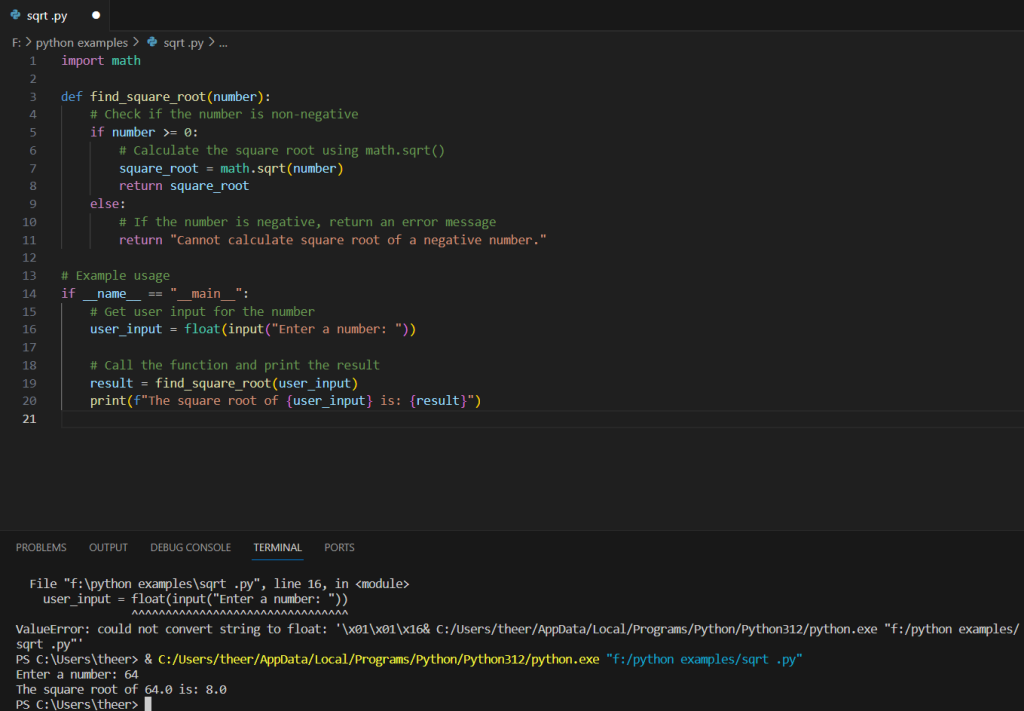
The provided Python program is designed to calculate the square root of a given number. It utilizes the math module, which provides the sqrt function for square root calculations. The program defines a function named find_square_root that takes a numeric input, checks if it is non-negative, and calculates the square root using the math.sqrt function. If the input is negative, the function returns an error message indicating that the square root of a negative number is undefined. In the main part of the program, it prompts the user to enter a number, converts the input to a float, and then calls the find_square_root function with the user-provided value. The result is printed, displaying the square root of the input if it is a non-negative number or an error message for negative inputs. This program provides a straightforward example of how to find the square root in Python, showcasing basic input handling and modular programming.
Source code
import math

def find_square_root(number):
    # Check if the number is non-negative
    if number >= 0:
        # Calculate the square root using math.sqrt()
        square_root = math.sqrt(number)
        return square_root
    else:
        # If the number is negative, return an error message
        return "Cannot calculate square root of a negative number."

# Example usage
if __name__ == "__main__":
    # Get user input for the number
    user_input = float(input("Enter a number: "))

    # Call the function and print the result
    result = find_square_root(user_input)
    print(f"The square root of {user_input} is: {result}")
Description
- Import the math Module:
import mathThe program begins by importing themathmodule, which contains various mathematical functions, includingsqrtfor calculating square roots. - Define the
find_square_rootFunction:def find_square_root(number):A function namedfind_square_rootis defined, which takes a single parameternumberrepresenting the input value for which the square root needs to be calculated. - Check for Non-Negativity:
if number >= 0:Within the function, it checks if the inputnumberis non-negative. - Calculate Square Root and Return Result:
square_root = math.sqrt(number) return square_rootIf the input is non-negative, the square root is calculated usingmath.sqrtand returned. - Handle Negative Input:
else: return "Cannot calculate square root of a negative number."If the input is negative, the function returns an error message indicating that the square root of a negative number is undefined. - Example Usage in the Main Part:
if __name__ == "__main__":This block checks if the script is being run as the main program. - User Input and Function Call:
user_input = float(input("Enter a number: ")) result = find_square_root(user_input)The program prompts the user to enter a number, converts the input to a float, and then calls thefind_square_rootfunction with the user-provided value. - Print Result:
print(f"The square root of {user_input} is: {result}")Finally, the program prints the result, displaying the square root of the entered number if it is non-negative, or an error message if the input is negative.
This program demonstrates a modular approach to finding the square root in Python, incorporating input handling and the use of the math module for mathematical calculations.
Screenshot