


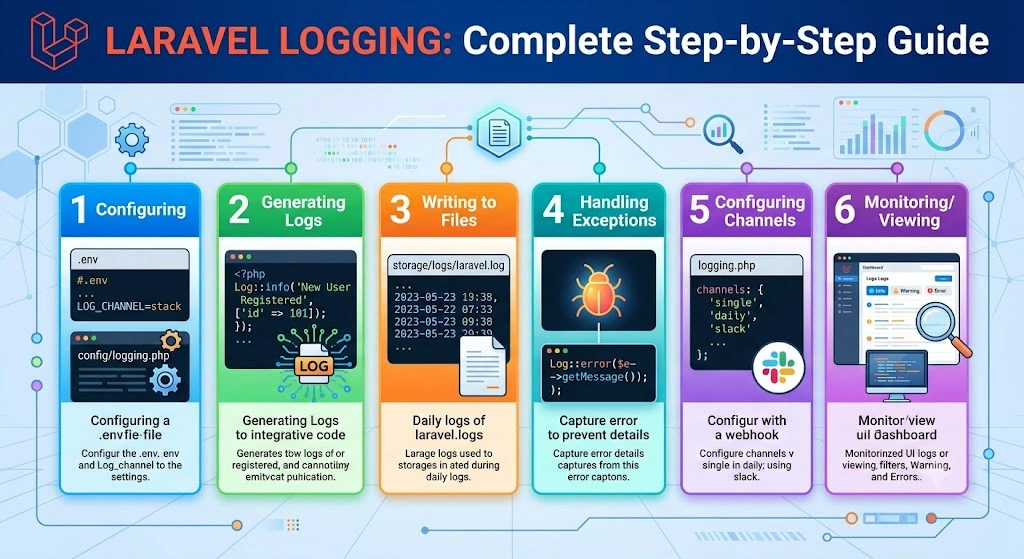
1. Introduction
This is Laravel Logging – Complete Step-by-Step Guide for Laravel. Logging is the process of recording application events, errors, warnings, and important runtime information into files or external services. Laravel still uses Monolog underneath and provides a simple API through the Log facade. If you are using Laravel 13 and some variables or declarations are not showing in your project, that is usually because:
- the default skeleton does not include every possible logging variable in
.env - the configuration file has been customized
- configuration is cached
- you are looking at a minimal installation or a starter kit that hides some defaults
Logs help developers:
- Debug errors
- Monitor application health
- Track user activity
- Audit system events
- Troubleshoot production issues
2. Why Logging is Important
Without logs:
- Errors become difficult to diagnose.
- Bugs are hard to reproduce.
- Production issues are difficult to trace.
With logs:
- Failures can be detected quickly.
- Application flow becomes easier to understand.
- Security events can be tracked.
- Performance issues can be monitored.
- Audit trails can be maintained.
3. Laravel Logging Architecture
Application
      │
      ▼
Log Facade
      │
      ▼
Logging Manager
      │
      ▼
Log Channel
      │
      ▼
Monolog
      │
      ▼
File / Slack / Syslog / Database / External Service
Laravel delegates the actual logging work to Monolog, while the framework provides a clean and expressive interface.
4. Configuration
Logging configuration is stored in:
config/logging.php
Environment variables are usually defined in:
.env
Common variables:
LOG_CHANNEL=stack
LOG_LEVEL=debug
Example:
LOG_CHANNEL=daily
LOG_LEVEL=info
If these variables are not visible in your Laravel 13 project, you can add them manually to your .env file.
If changes do not appear immediately, clear cached configuration:
php artisan config:clear
php artisan cache:clear
php artisan optimize:clear
You can also inspect the active configuration with:
php artisan tinker
Then run:
config('logging.default');
5. Log Channels
A channel determines where logs are written.
Common channels:
- stack
- single
- daily
- slack
- syslog
- errorlog
- null
- custom
Example:
'default' => env('LOG_CHANNEL', 'stack'),
In Laravel 13, this line is usually found inside config/logging.php.
6. Log Levels
Laravel supports PSR-3 log levels.
| Level | Description |
|---|---|
| emergency | System unusable |
| alert | Immediate action required |
| critical | Critical condition |
| error | Runtime errors |
| warning | Warning conditions |
| notice | Normal but significant |
| info | Informational messages |
| debug | Detailed debugging information |
Example:
Log::debug('Debug Message');
Log::info('User Logged In');
Log::warning('Disk Space Low');
Log::error('Payment Failed');
Log::critical('Database Down');
7. Writing Logs
Import the facade:
use Illuminate\Support\Facades\Log;
Examples:
Log::info('Application Started');

Log::error('Something went wrong');

Log::warning('Invalid Login Attempt');
You can also log arrays for structured output:
Log::info('User profile updated', [
    'user_id' => 10,
    'status' => 'success',
]);
8. Contextual Logging
Additional data can be attached to a log entry.
Log::info('User Login', [
    'id' => 10,
    'email' => 'john@example.com'
]);
This is useful when you want to include extra details without writing a separate message for each value.
Output may look like:
User Login
id:10
email:john@example.com
9. Stack Channels
Multiple channels can be used simultaneously.
Example:
'stack' => [
    'driver' => 'stack',
    'channels' => ['single', 'slack'],
],
Now every log goes to:
- File
- Slack
This is useful when you want local storage and real-time alerts at the same time.
10. Single Logs
Stores everything in one file.
storage/logs/laravel.log
Configuration:
'single' => [
    'driver' => 'single',
    'path' => storage_path('logs/laravel.log'),
]
This is the simplest logging setup and is often used in development.
11. Daily Logs
Creates one log file per day.
Example:
laravel-2026-07-08.log
laravel-2026-07-09.log
Configuration:
'daily' => [
    'driver' => 'daily',
    'path' => storage_path('logs/laravel.log'),
    'days' => 14,
]
Old logs are automatically deleted after the configured number of days.
12. Slack Logging
Receive production alerts in Slack.
Configuration:
LOG_SLACK_WEBHOOK_URL=https://hooks.slack.com/...
Example:
Log::critical('Server Down');
Slack logging is useful for urgent alerts that need immediate attention.
13. Syslog Logging
Writes logs to the operating system log.
'syslog' => [
    'driver' => 'syslog',
]
Useful for Linux servers and environments where system-level logging is preferred.
14. Errorlog Logging
Uses PHP’s native error_log() function.
'errorlog' => [
    'driver' => 'errorlog',
]
Useful for Docker containers, shared hosting, or environments where file access is limited.
15. Custom Log Channels
You can define your own channel for a specific purpose.
Example:
'custom' => [
    'driver' => 'single',
    'path' => storage_path('logs/payment.log'),
]
Usage:
Log::channel('custom')->info('Payment Success');
This is helpful when you want separate logs for payments, API calls, admin actions, or background jobs.
16. Custom Log Drivers
You can create a custom driver when the built-in channels are not enough.
Example:
Log::extend('custom', function () {
    //
});
Custom drivers are useful for:
- APIs
- Databases
- Elasticsearch
- Cloud logging
- Third-party monitoring tools
In Laravel 13, custom drivers are still built using the logging manager and Monolog integration.
17. Monolog Integration
Laravel wraps Monolog and allows you to customize handlers and formatters.
You can customize handlers using a tap class:
'tap' => [
    App\Logging\CustomizeFormatter::class,
]
Possible customizations:
- JSON formatting
- Line formatting
- Log rotation
- External integrations
- Custom processors
- Custom handlers
This is useful when you need logs in a specific format for tools like ELK, Datadog, or Papertrail.
18. Exception Logging
Laravel automatically logs exceptions.
Example:
throw new Exception('Payment Failed');
Exceptions appear in:
storage/logs/
You can also log exceptions manually:
try {
    // Code that may fail
} catch (Exception $e) {
    Log::error($e->getMessage());
}
In Laravel 13, exception handling is still tightly integrated with the framework, so most uncaught exceptions are logged automatically.
19. Logging Database Queries
Example:
DB::listen(function ($query) {

    Log::info($query->sql);

});
You may also log bindings and execution time:
DB::listen(function ($query) {
    Log::info('SQL Query Executed', [
        'sql' => $query->sql,
        'bindings' => $query->bindings,
        'time' => $query->time,
    ]);
});
Useful for:
- Slow queries
- SQL debugging
- Performance optimization
20. Logging HTTP Requests
Middleware example:
Log::info('Incoming Request', [

    'url' => request()->url(),

    'method' => request()->method(),

]);
You can also include headers or user information when needed:
Log::info('Incoming Request', [
    'url' => request()->fullUrl(),
    'method' => request()->method(),
    'ip' => request()->ip(),
    'user_id' => auth()->id(),
]);
Useful for:
- API debugging
- Request auditing
- Security monitoring
21. Logging Jobs & Queues
Example:
public function handle()
{
    Log::info('Job Started');

    // Job logic

    Log::info('Job Completed');
}
You can also log failures inside queued jobs:
public function failed(Throwable $exception): void
{
    Log::error('Job Failed', [
        'message' => $exception->getMessage(),
    ]);
}
This is useful when background processing needs to be monitored.
22. Logging Events
Example:
Log::info('User Registered');
You can also log inside event listeners:
public function handle(UserRegistered $event): void
{
    Log::info('User Registered Event Fired', [
        'user_id' => $event->user->id,
    ]);
}
This helps track application behavior across different parts of the system.
23. Log Rotation
Daily logging supports rotation.
Example:
'days' => 30
Laravel automatically removes older logs after the configured retention period.
This helps prevent log files from growing too large and consuming too much disk space.
24. Security Best Practices
Avoid logging:
- Passwords
- API keys
- JWT tokens
- Credit card numbers
- Sensitive personal information
Instead, log only safe identifiers:
Log::info('User Updated Profile', [

    'user_id' => $user->id

]);
If you need to inspect sensitive data during development, do it temporarily and remove it before deploying to production.
25. Performance Considerations
Avoid excessive logging in loops.
Bad:
foreach ($users as $user) {
    Log::info($user);
}
Better:
Log::info('Processed Users', [

    'count' => count($users)

]);
Logging too much data can slow down your application and fill disk space quickly.
26. Testing Logs
Laravel provides tools for testing log output.
Example:
Log::spy();
You can assert that a log message was written:
Log::shouldReceive('info')
    ->once();
This is useful for unit tests and feature tests where you want to confirm that logging behavior occurred.
27. Common Examples
User Login
Log::info('User Login', [
    'id' => $user->id
]);
Payment
Log::info('Payment Completed');
Failed Payment
Log::error('Payment Failed');
API Response
Log::debug($response);
Validation Error
Log::warning('Validation Failed');
These examples can be adapted for Laravel 13 without major changes.
28. Best Practices
- Use appropriate log levels.
- Separate logs by feature or domain.
- Never log secrets.
- Rotate logs regularly.
- Monitor logs in production.
- Use contextual information.
- Prefer structured logging (arrays or JSON).
- Use dedicated channels for important services.
- Archive logs when required for compliance.
- Review logs periodically.
- Clear configuration cache when logging changes do not appear.
- Verify
.envvalues if variables are missing.
29. Summary
Laravel 13 provides a flexible and powerful logging system built on Monolog. By configuring channels, choosing suitable log levels, adding contextual data, and following best practices, you can create logs that are useful for debugging, monitoring, auditing, and maintaining your application.
If some variables or declarations are not showing in your Laravel 13 project, check the following:
config/logging.php- your
.envfile - cached configuration
- custom starter kits or project templates
Advanced capabilities such as custom channels, Monolog customization, log rotation, and integrations with external services make Laravel logging suitable for applications of all sizes.